Ir directamente a la información del producto
1 de 7

Hearvo

USB 3.0 HDMI KVM Switch 1 Monitors 4 Computers, 4K@60Hz KVM Switches for 4 Computers Sharing Monitor Keyboard Mouse Hard Drives Printer, with EDID Adaptive,1 HDMI Cable and 4 USB Cable

USB 3.0 HDMI KVM Switch 1 Monitors 4 Computers, 4K@60Hz KVM Switches for 4 Computers Sharing Monitor Keyboard Mouse Hard Drives Printer, with EDID Adaptive,1 HDMI Cable and 4 USB Cable

Precio habitual $64.99 USD
Precio habitual Precio de oferta $64.99 USD
Oferta Agotado
Impuestos incluidos. Los gastos de envío se calculan en la pantalla de pago.
Style
Cantidad

【KVM Switch 1 Monitors 4 Computers】This HDMI KVM Switch with two HDMI ports allows control of 4 Computers, enabling them to share a single monitor along with keyboard and mouse. It's complete USB switch and HDMI switch rolled into one. This KVM Switch also supports various input devices such as PCs, Laptops, PS4, etc. It is compatible with various operating systems including Windows 7/8/10/11/Vista/XP, Linux, Mac, and more.
【Three USB 3.0 ports】KVM switches features 3 USB 3.0 ports for ultra-fast data transfer speeds of up to 5Gbps. It allows you to seamlessly share peripherals like printers and external drives between 4 Computers, reducing clutter and enhancing efficiency. Ideal for sharing USB devices such as keyboards, mice, scanners, printers, and flash drives, this KVM switch automatically detects and matches connected devices on both computers.
【4K Resolution & HDCP 2.2】HDMI KVM Switch supports stunning 4K resolution at 60Hz, ensuring crystal-clear and highly detailed visuals for your monitors. Additionally, it is HDCP 2.2 compliant, allowing you to seamlessly view HDCP-protected content on your monitors without any interruptions. It also supports 4K@30Hz, 2K, 3D, and 1080P, offering flexibility for various display needs. This guarantees both exceptional image quality and a smooth, secure multimedia experience.
【Adaptive EDID & Plug and Play】This USB 3.0 HDMI KVM Switch features Adaptive EDID, ensuring stable and smooth image transmission by automatically optimizing display settings on your monitors. Easy to install, this HDMI KVM switch requires no driver software—just plug it in and connect all cables for seamless operation between 4 computers and one monitor.
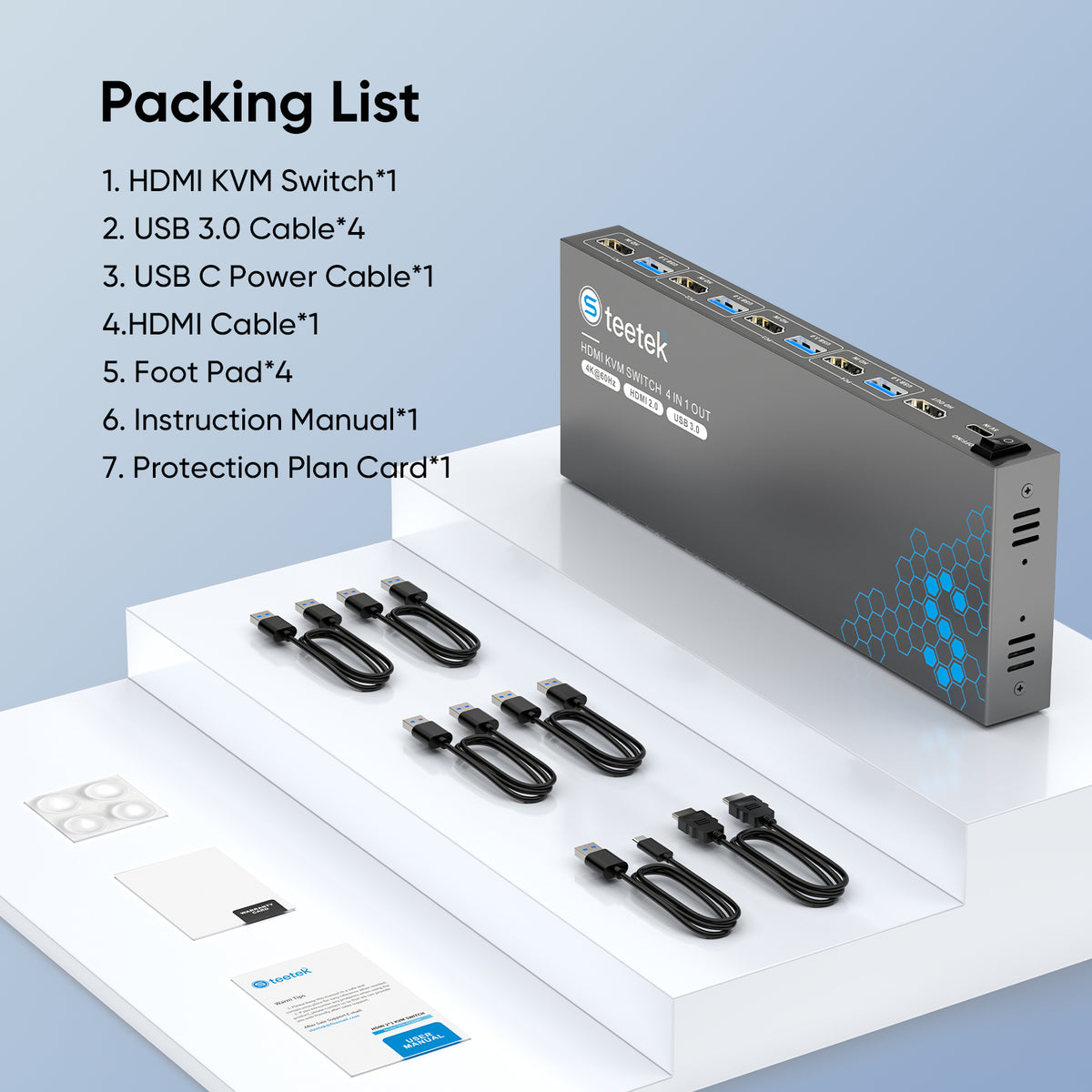
【Complete Package】The package includes everything you need for seamless setup: 1* HDMI KVM Switch 4port unit,1 HDMI Cable, 4 high-speed USB 3.0 cables for fast data transfer between computers, Protection Plan card for peace of mind, user manual for easy installation and troubleshooting, and 4 anti-slip rubber pads to keep your KVM switch stable and secure. Enjoy added reassurance with our lifetime Protection Plan, ensuring long-term peace of mind and support for your HDMI KVM Switch 1 Monitors 4 Computer

Ver todos los detalles
  • 5 stars: 64 (89%)
  • 4 stars: 8 (11%)
  • 3 stars: 0 (0%)
  • 2 stars: 0 (0%)
  • 1 star: 0 (0%)
K
Kenzo
Reliable

It works very good

G
Gerard
Small, efficient, effective!

Great piece of hardware. I wfh, 2 work laptops and my personal so desk space is a premium commodity. Works great even with my fussy HP E34m G4 that requires a USB C in order for the built in camera to work. I finally got rid of 2 extra keyboards and mice.

D
Derrick Jackson
Kvm

Works great

N
NOLBERTO RIVERA A
Smooth Operation Across Windows and Linux

I manage both Windows and Linux desktops for my personal projects. Some KVMs have trouble with Linux, but this one worked perfectly. After connecting all four computers, the switch detected each system without any additional configuration. The 4 USB 3.0 ports let me share my printer, scanner, and external SSD between machines, which is extremely convenient. Switching between computers is fast, and the 4K@60Hz output is flawless. Setup was quick and painless. Highly recommended for multi-OS users.

D
Depeg911
As Good as the older TeeTek KVM Switch (2 Computer, 1 Monitor)

I already had the TeeTek USB 3.0 HDMI KVM Switch for 2 Computers, 1 Monitor and needed one to connect 4 more computers to another monitor. This new TeeTek device works just as good as the 2 Computers, 1 Monitor version. Just note that unlike the older TeeTek KVM Switch (which did not require separate power), you have to supply your own 5v plug-in adapter (only the cable is provided).

B
Bruce Bell
Works like a champ.

This KVM works like a champ. Works with every PC I have tested it on. If I were to ask for something on this switch it would be to put LED lights in the remote showing which port was active. Otherwise, I highly recommend.

B
Bbinder
Perfect for multi-PC setups

Perfect for multi-PC setups

Pros:
No Power Brick: Powered via the USB inputs from the PCs.
Wireless Support: Works great with wireless peripherals.
Compact: Very small footprint on the desk.

Cons:
None so far!

Bottom Line: If you need to switch between 4(or 3) computers and want to avoid extra power cords, this is the one to get.

D
Dana Prall
just what was ordered

works good

R
Robert J. Nagel
Nice KVM for use with several Raspberry Pis.

Works great and a great price for Raspberry Pis and Linux boxes.

T
T. Dempsey
I wish it had USBC power delivery at this price point.

I mounted this under my desk. while it works as I expect it to, having cords on both sides just doesn't work well in the location I chose. (I can hit the 3 USB plugs on the front with my knee). that's not the hub's fault, that's mine for putting it there). no power supply included and it doesn't say how big of a power supply it needs. I've had some issues with my desktop waking on keyboard or mouse after this was installed. I do find it interesting that my Macbook would wake on keyboard pretty consistently. it's easy to set up, enough connections for a simple setup at a decent price. I really wish my desktop would go back to waking on keyboard or mouse like it did before this was set up. still a pretty decent product.

R
Randolph S.
Works, with a little strangeness.

The first port didn't work for me so far, so I'm using ports 2 and 3. Otherwise, working fine. May try a third device/PC on the first port again. Be aware, the KVM needs power and draws it from USB on one of the host machines, not its own power supply.

C
Chuck
Works on MAC running 15.7!

My old KVM stopped working with my Macs a few years back. I discovered its due to a change Apple made that broke KVMs back on 14.x OS. Upgraded my old 4 port KVM to this one and now I can use my Macs again using this KVM.

N
Not My Name
JUST WORKS!!!!!

Make sure that you have html cables for your computers, only one html cable is included. there are four USB 3.0 cables included. Works perfectly, just hook it up, no drivers needed, it just works. Great device. Perfect!!!!!!!!!!

J
John Siegel
Good but missing HDMI cables for the computers you're connecting

IT was easy to configure but only contained the 4 USB cables but not all 5 HDMI connectors.
Nonetheless I was able to get the 4 cables delivered the next day

Ju

N
NM
Fantastic product! 4 port single-HMDI (Spring 2024 model).

This review is for the Spring 2024 version NOT the updated 2025 model. Finally getting around to this as was amazed to discover the HDMI output works with older VGA monitors if one uses a converter.

Purchased the 4 port HDMI/USB single video switch to manage PCs from a smaller footprint. In hindsight an 8 port dual video would have allowed greater flexibility with an even smaller footprint but chose the 4 port to save money. Ironically ended up with TWO 4 ports since there were stock issues and the Seller let me keep the first unit (no charge). But only had a single HDMI monitor so the first unit stayed in the box.

Recently considered getting the first unit operational as apparently it had been previously tried-and-returned with incomplete-ish accessories. Did what others have suggested by using an AC power adapter instead getting power from a USB port. Only trick was needing to purchase a six foot cable since the supplied USB power cable was too short to reach a given power outlet. Seven PCs, two 4 port HDMI switches, and one HDMI monitor. Hindsight and an 8 port would have been ideal, so tried a $10 HDMI-VGA converter to connect the first switch's HDMI-OUT to a 15 pin VGA monitor. It worked!

So far as other trivia goes: Am more interested in eliminating monitors and keyboards than using flash drives since I'd still have to do the Safe To Remove Hardware bit between systems. Have tried various wired keyboards/mice with no issues, but primarily use Logitech wireless K330 keyboards with M570 trackball mice (paired with the Unifying Software) as I've had luck with this combination over the years.

K
Klodnito
Share Screen/Keyboard/Mouse with one KVM

This is a 4 computer KVM with USB 3 USB ports

Pros:
It works. Press a button and it goes to that PC.
I get 4K 60Hz on my monitor.
Cons:
Because there is no USB 2 port or a separate USB 3 port
I can't plug in and use my USB3 flash drive.
If I plug it in, the mouse and keyboard become unusable.
It's one of those tiny flash drives 64GB.

I can still use my USB flash drive if I plug it into the PC that needs it.

Since I can still use the KVM on my 4 PC's I still give it a thumbs up.
Just 4 instead of 5.

S
Skeezics
Helpful

I work with multiple computers. This has made the transition between using them quite helpful.

T
TK Rabenberg
Worked great for me; but then weirdness...

The product worked fantastic...for several months, and then... Here's my situation. I've got a desk that faces out into the room instead of facing the wall where my 3 computers are (two Win10, one Win11). So I have a 20' HDMI cable, and a 20' single USB3 cable. At the end of this 20' USB3 cable on my desk is then a powered USB hub. Connected to this hub is my USB mouse, USB keyboard, and a USB fed ifi Headphone amp.
Everything worked fine for quite a while; but now, two of my computers go into a frenzy of mouse/keyboard disconnects and then reconnects about every 10 seconds. Insane I know. My main workstation was fine, but it just started doing the same but with an interval of maybe a few minutes or less to way longer (so the issue is similar with two computers but different with another).
Last week things were almost back to normal, but it started up again this week. Yes I've tried every USB3 and USB2 ports on this SFF Dell; and also swapped out USB cables to the KVM. I even plugged in a USB power adapter to the Power Plug on the KVM thinking maybe that was the issue, but no changes.
Watching the Windows Device Manager: it is the HID (human interface devices) that keep dropping and reconnecting.
I'm about to buy something else.
Have I bypassed my USB Hub on my desk and connected my Keyboard/Mouse directly to the KVM? No I haven't.

A
Anthony Adams
Excellent build quality.

Excellent build quality. Product arrived quickly. Plug and play design1 min learning curve, if any. Works extremely well.

s
so much fun
great value for the money

Value for money:
has worked great so far

R
Ronald L Boetger
You would have to purchase 4 HDMI cables.

The unit works well. You would have to purchase 4 HDMI cables.

J
Jonathan Turlington
Great Fast Switching

Great fast switching. No complaints, currently working with 3 computers one more to come.

J
Jae Noh
Working or not

Working perfectly

Q
Qwerty
Worked the first time. Just plug and Play.

Worked the first time.

K
KU
"Great KVM for Multi-Laptop Setups"

Solid KVM switch for multi-device setups. I'm running three laptops through it and the switching is seamless. It doesn’t include a power adapter, but the included USB-A to USB-C adapter made it easy to power with an old phone charger. No stability issues so far. Great value for what it offers.

T
TenOfTens
Power fluctuations on the USB pass-through and corrupts data and loses connectivity on peripherals

2025.03.28 updated review: The second unit I got as a replacement was free and they didn't even have me send the the original back. The USB ports are still not very high quality but they are appropriate for the price of the device. Just make sure you test yours quickly when you buy this product and make sure that the USB ports are not cutting in and out on you. You can lose some valuable data depending on what you plug into these USB ports.

2025.03.18 original review: I got this unit on 2025.01.27. the USB pass-through started getting worse and worse over the past 3 months and now I can't even boot an operating system off of the USB drive. It corrupts data that it tries to load. I've done checksums before and after on the drive and all the data becomes different after trying to boot from it through this device. Wireless keyboards wired keyboards, mice. Nothing works constantly to continuously cut in and out of operation. These things aren't even cheap but yet this thing's a piece of junk.